请注意,本文编写于 527 天前,最后修改于 457 天前,其中某些信息可能已经过时。
目录
一、前言
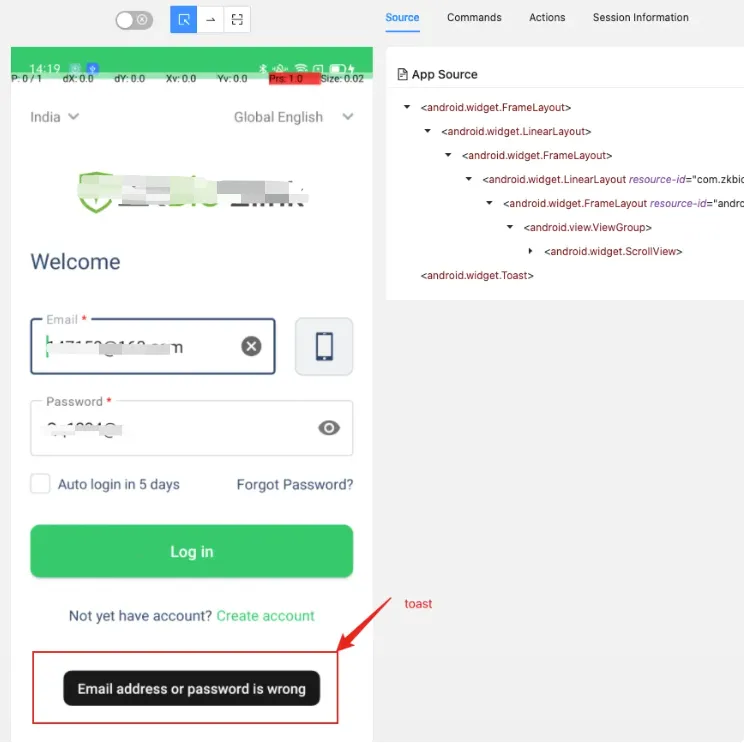
app自动化测试过程中经常会遇到需要对toast进行定位,并获取其中的文本进行断言,如下图,通过定位“Email address or password is wrong”则可知登陆测试用例没有通过,并且这个提示框很快就会消失,并不需要用户自己执行关闭操作。但toast区别于控件元素,无法获取焦点,不能通过appium,weditor等工具定位。
二、环境
- Mac
- Android 10
- appium 2.0.1(desktop)
- selenium 4.10.0
- jdk 1.8
三、前提条件
- appium自动化测试环境本身没有问题
- appium server 的版本应该在1.6以上(为避免不必要的麻烦请安装最新版本)
- Toast是无法通过定位工具进行成功定位的,只能通过seleium中的显示等待方法presence_of_element_located来进行定位
- 初始化参数时需要指定automationName为UIAutomator2
四、Toast定位表达式
Toast虽然无法通过定位工具进行获取,但是几乎所有的toast都包含一段文本,可认为这段文本就是toast的属性值,因此我们可以通过text属性结合Xpath模糊定位来定义toast定位表达式-->:"//*[contains(@text,'{}')]".format("toast文本值")。
测试代码如下:
Python"""
@File:demo.py

Author:Qi.Zhang

@Software:PyCharm
"""
from appium.webdriver.common.mobileby import MobileBy
from appium import webdriver
from selenium.webdriver.support import expected_conditions as ec
from selenium.webdriver.support.wait import WebDriverWait

desired_caps = {
    "platformName": "Android",
    "platformVersion": "10",
    "deviceName": "49930131",
    "appPackage": "com.zkbio.zlink",
    "appActivity": ".ui.splashScreen.SplashActivity",
    "noReset": True,
    "enableMultiWindows": True,
    "automationName": "UiAutomator2",
    'newCommandTimeout': '6000'
}
url = "http://127.0.0.1:4723/wd/hub"


def wait_present_element(locator):   # 判断某个元素是否存在DOM中,不一定可见,存在则返回该元素对象
    return WebDriverWait(driver, 30, 0.01).until(ec.presence_of_element_located(locator))


# 初始化driver
driver = webdriver.Remote(command_executor='http://127.0.0.1:4723/wd/hub', desired_capabilities=desired_caps)
# 输入邮箱
wait_present_element((MobileBy.ID, "com.zkbio.zlink:id/txtInput_email")).send_keys("147159@163.com")
# 输入密码
wait_present_element((MobileBy.ID, "com.zkbio.zlink:id/edit_password")).send_keys("Qq1234@q")
# 点击登陆
wait_present_element((MobileBy.ID, "com.zkbio.zlink:id/login_button")).click()
# toast获取
toast = wait_present_element((MobileBy.XPATH, "//*[contains(@text, '{}')]".format('is wrong')))
context = toast.get_attribute("text")
print("toast的文本只为{}".format(context))
driver.quit()
python输出
/Library/Environment/ZKBio_Zlink/bin/python3 /Library/Pycode/ZKBioZlink/demo.py
toast的文本只为Email address or password is wrong

进程已结束,退出代码为 0
本文作者:精卫
本文链接:
版权声明:本博客所有文章除特别声明外,均采用 BY-NC-SA 许可协议。转载请注明出处!
目录